Showing posts with label BIOS. Show all posts

Friday, June 27, 2025

How to upgrade G4520G6 (B7149) Ffirmware

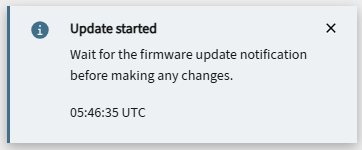
 G4520G6 firmware process


Web GUI mode: CPLD -> BMC -> BIOS

BMC Out of band (Redfish/BMC Web) :

CPLD: *.jed.tar (System need power off.)

BMC: *_full.bin / *_partial.bin (Power on/off both can be updated.)

BIOS: *.bin.tar.gz (System need power off.)


CPLD:

Firmware -> 


BMC


Note: BMC ip will change after BMC firmware update while firmware upgrade to v1.02.(DHCP mode)


EFI mode: BMC -> BIOS

1. 


Monday, December 12, 2022

How to set Tyan B8252G79AE12HR-2T support SATA device

 B8252G79AE12HR-2T, BIOS v2.08.B22


Change J12 SATA or NVMe link Select from [NVME] to [SATA]. Then HDD#0~3 can support both SATA and NVMe devices.


Friday, April 9, 2021

How to modify Tyan Motherboard/Barebones FRU information

Requirement:

Linux environment

ipmitool

Tyan FRU file editor Utility v0.20


Command

./fruedit --dump xxx.txt => dump FRU file to readable text.


Change Product Manufacturer and Serial Serial Number
./fruedit --pdmfc TYAN --pdsn TCI3832E0025
Check update result
./fruedit --dump b7102new.txt


Thursday, September 10, 2020

How to setup B7119 to running with 10x Nvidia Tesla V100 32G GPU cards

Tyan FA77-B7119 can install 10x GPU cards, but if you install 10x Nvidia Tesla V100 32G GPU cards. The FA77-B7119 will hang code at "B6".


Hardware Configuration

FA77-B7119, BIOS v2.02.B10, BMC v7.0

CPU: Intel Xeon 8268 x2

RAM: DDR4-2666 64GB x24

OS: Ubuntu 18.04.4 Server LTS

GPU: Nvidia Tesla V100 32G x10


It needs to remove all Nvidia Tesla V100 32G GPU cards and change BIOS setting as below.
1. Boot FA77-B7119 to BIOS.
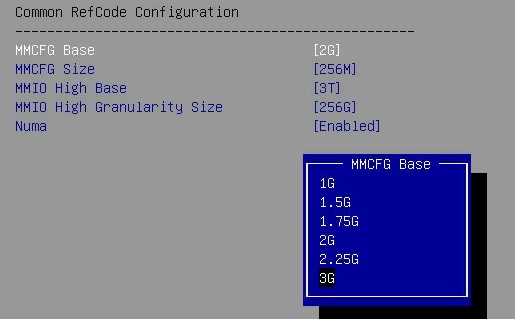
2. Change Socket Configuration => Common RefCode Configuration => MMCFG Base parameter from "2G" to "3G".

3. Change Socket Configuration => Common RefCode Configuration => MMIO High Granularity Size parameter from "256G" to "1024G".

4. Save and Reboot
5. DC-OFF, AC-OFF FA77-B7119.
6. Reinstall Nvidia Tesla V100 32G GPU cards.
7. AC-ON, DC-ON FA77-B7119.
8. Boot up FA77-B7119 to OS.


Wednesday, February 26, 2020

How to config M7106-4E OCP adapter in B7109 and B7119

1. Change BIOS setting "Socket Configuration" => IOU1 (IIO PCIe BR2)" from "x16" to "x4x4x4x4".

2. The Port 2C and Port 2D are available to connect U.2 NVME devices.
3.  M7106-4E NVME01 port is available to connect U.2 NVME devices.(The lower port)

2026-06-11-如何在R2520G6透過Redfish指令進行遠端韌體更新

title: 如何在 R2520G6 透過 Redfish 指令進行遠端韌體更新  date: 2026-06-01  tags: [R2520G6, Redfish, Firmware, BIOS, BMC, CPLD, ROT]  last_updated: 2026-06-...