Tuesday, November 17, 2020

How to change Tyan BMC Logo (AST2500 only)

OS requirement: Ubuntu 16.04.5 LTS Server

Target Server: Tyan S8026

Process:

0. unzip customer.zip file

1. Sudo apt-get install make mtd-utils:i386

2. tar xvf fwm_v03.tar

3. sudo cp 80260104.ima /home/fae/fwm_V003/release/.

4. sudo cp customer.zip files to /home/fae/fwm_V003/release/customer/.

4. Sudo ./fwm.sh 80260104.ima

5. Get new firmware image at /homw/fae/fwm_V003/output/new.ima

6. Upgrade S8026 BMC firmware.


image rule

banner.jpg: 220x50 (256 color)

favicon.ico: 16x16 (256 color)

logo.bmp: 800x600 (8bit, 256 color)


Tuesday, October 27, 2020

How to save BMC SEL event to SD card

Step1. 在安裝SD到MB上之前,先格式化SD卡,檔案格式為EXT3以及至少分割1個磁區

Step2. 使用IPMI OEM command add OEM SEL (record type 0xDF) 到SD card

ipmitool -H 127.0.0.1 -U root -P superuser raw 0x32 0xcc 1 0 0xdf 4 5 6 7 8 9 0xa 0xb 0xc 0xd 0xe 0xf 0x10 0x11 0x12 0x13 0x14

Step3. 透過BMC debug console 確認SEL存放於SD


資料夾的路徑: /mnt/sdmmc0p1/ExtendSELData/BMC1/

SEL檔案名稱: File_$(SEL_Record_ID), example File_002


延伸閱讀

如何使用EaseUs Partition Master Free 在Windows中格式化Linux EXT3/4 USB

Thursday, October 22, 2020

How to set Nvidia GPU device power limit


Use below command to set Nvidia GPU devices power limit.

#nvidia-smi –i 0 –pm 1

#nvidia-smi –i 1 –pm 1

#nvidia-smi –i 2 –pm 1

#nvidia-smi –i 3 –pm 1

#nvidia-smi –I 0 –pl 210

#nvidia-smi –I 1 –pl 210

#nvidia-smi –I 2 –pl 210

#nvidia-smi –I 3 –pl 210


Also use below command to disable persistence mode after gpu_burn test.

#nvidia-smi –i 0 –pm 0

#nvidia-smi –i 1 –pm 0

#nvidia-smi –i 2 –pm 0

#nvidia-smi –i 3 –pm 0


Tuesday, September 22, 2020

How to set BMC MAC Address in DOS Mode

If BMC MAC Address became 00-00-00-00-00-00.  You can use the follows DOS command to re-write BMC MAC Address by follows DOS command.


bmce2p –h –m 0123456789ABCDEE –n 0123456789ABCDEF

-m [MAC Address 1]         Write MAC Address 1

-n [MAC Address 2]          Write MAC Address 2


Zip file as below

BMCE2P

Wednesday, September 16, 2020

How to set BMC MAC Address by ipmi command


Set Manufacture Data Command

#ipmitool -H <BMC IP> -U root -P <BMC password> raw 0x2e 0xd 0xfd 0x19 0x0 0x5  00 22 44 66 88 22 (= BMC MAC 1 Address, 6 Bytes)


Get Manufacture Data Command:

#ipmitool -H <BMC IP> -U root -P <BMC password> raw 0x2e 0xe 0xfd 0x19 0x0 0x5

fd 19 00 00 22 44 66 88 22

Thursday, September 10, 2020

How to setup B7119 to running with 10x Nvidia Tesla V100 32G GPU cards

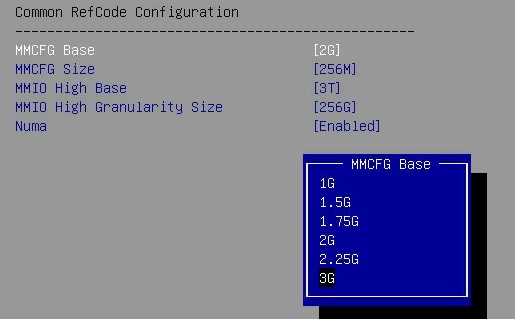
Tyan FA77-B7119 can install 10x GPU cards, but if you install 10x Nvidia Tesla V100 32G GPU cards. The FA77-B7119 will hang code at "B6".


Hardware Configuration

FA77-B7119, BIOS v2.02.B10, BMC v7.0

CPU: Intel Xeon 8268 x2

RAM: DDR4-2666 64GB x24

OS: Ubuntu 18.04.4 Server LTS

GPU: Nvidia Tesla V100 32G x10


It needs to remove all Nvidia Tesla V100 32G GPU cards and change BIOS setting as below.
1. Boot FA77-B7119 to BIOS.
2. Change Socket Configuration => Common RefCode Configuration => MMCFG Base parameter from "2G" to "3G".

3. Change Socket Configuration => Common RefCode Configuration => MMIO High Granularity Size parameter from "256G" to "1024G".

4. Save and Reboot
5. DC-OFF, AC-OFF FA77-B7119.
6. Reinstall Nvidia Tesla V100 32G GPU cards.
7. AC-ON, DC-ON FA77-B7119.
8. Boot up FA77-B7119 to OS.


Wednesday, July 1, 2020

How to install Cuda 10.2 in Tyan B8252 (updated)

If met problem in compiler gpu_burn v1.0
(nvcc is missing)

$sudo apt-get install nvidia-cuda-toolkit
$sudo make

issue fixed

2026-06-11-如何在R2520G6透過Redfish指令進行遠端韌體更新

title: 如何在 R2520G6 透過 Redfish 指令進行遠端韌體更新  date: 2026-06-01  tags: [R2520G6, Redfish, Firmware, BIOS, BMC, CPLD, ROT]  last_updated: 2026-06-...